
FEATURE
Article Image Styles: The Card and the Picture
Article Image Styles: The Card and the Picture
Every website starts with the Branded template card. With Expert mode, on Growth and above, you can switch to an art-directed picture in one of six styles on the Brand page.
Every website starts with the Branded template card. With Expert mode, on Growth and above, you can switch to an art-directed picture in one of six styles on the Brand page.
✓ Starter
✓ Growth
✓ Scale
How every article image is made: read the site, make the card (or, with Expert mode, the picture), check it against the site, publish it with the article.
Two websites should not always get the same kind of image. A site built on photography of its people can look wrong with a designed card, and a typographic, illustrated or dark editorial site looks wrong with a photograph that could be anyone’s. That is why Expert mode lets you choose per website.
Two websites should not always get the same kind of image. A site built on photography of its people can look wrong with a designed card, and a typographic, illustrated or dark editorial site looks wrong with a photograph that could be anyone’s. That is why Expert mode lets you choose per website.
What It Is
What It Is
The Branded template is a designed card: a kicker, the headline in bold capitals with one word in your accent colour, an isometric illustration of the topic, your logo and your domain. It is the same frame every time, so a blog or a social feed reads as one publication.
The Branded template is a designed card: a kicker, the headline in bold capitals with one word in your accent colour, an isometric illustration of the topic, your logo and your domain. It is the same frame every time, so a blog or a social feed reads as one publication.
An art-directed picture is one image made for one article in a style chosen for your brand: editorial photography, photography, conceptual still life or product photography, illustration, graphic design, or abstract. The headline and logo are set on it by us, never drawn by the image model. Pictures are available with Expert mode.
An art-directed picture is one image made for one article in a style chosen for your brand: editorial photography, photography, conceptual still life or product photography, illustration, graphic design, or abstract. The headline and logo are set on it by us, never drawn by the image model. Pictures are available with Expert mode.
Why It Matters
Why It Matters
Imagery is the first thing people judge, and consistency is what makes a publication look like one. A card system gives a growing blog a spine, and with Expert mode a photo-led brand can keep the warmth its site already has. Either way the reader never meets a stock photo or a piece of clip art.
Imagery is the first thing people judge, and consistency is what makes a publication look like one. A card system gives a growing blog a spine, and with Expert mode a photo-led brand can keep the warmth its site already has. Either way the reader never meets a stock photo or a piece of clip art.
The practical payoff is that nothing waits on a designer. Every article arrives with its image made, checked and sized, and in Expert mode the Brand page lets you switch between the card and pictures in a click.
The practical payoff is that nothing waits on a designer. Every article arrives with its image made, checked and sized, and in Expert mode the Brand page lets you switch between the card and pictures in a click.
How It Works in Awareness Marketing
How It Works in Awareness Marketing
We Read Your Website
When a site is added we read how it presents itself: its colours, typeface and logo, and whether the homepage leads with real photographs or with typography, illustration and colour. That shapes how your images look.
When a site is added we read how it presents itself: its colours, typeface and logo, and whether the homepage leads with real photographs or with typography, illustration and colour. That shapes how your images look.
Pictures for Photo-Led Sites, With Expert Mode
With Expert mode, a site built on photography can switch to art-directed pictures, usually editorial photography, in its own light and tones, with the headline set in the calm half of the frame and the logo in place.
With Expert mode, a site built on photography can switch to art-directed pictures, usually editorial photography, in its own light and tones, with the headline set in the calm half of the frame and the logo in place.
Every Site Starts With the Card
Every site starts with the Branded template. With Expert mode you can switch on the Brand page, where the six picture styles are shown as samples on your own brand ground before you commit.
Every site starts with the Branded template. With Expert mode you can switch on the Brand page, where the six picture styles are shown as samples on your own brand ground before you commit.
The Styles, Side by Side
The Styles, Side by Side
Branded Template
The default for every site. The same frame on every article: kicker, headline, illustration, logo. magecart.co.uk shown.
The default for every site. The same frame on every article: kicker, headline, illustration, logo. magecart.co.uk shown.

Branded Template on a Light Brand
Same structure, the site’s own blue and typography. DDoSInfo shown.
Same structure, the site’s own blue and typography. DDoSInfo shown.

Editorial Photography
With Expert mode, the usual choice for a website whose homepage leads with real photographs of people and places. Data Protection People shown.
With Expert mode, the usual choice for a website whose homepage leads with real photographs of people and places. Data Protection People shown.

Photography
With Expert mode, for photo-led sites where the picture should carry the mood rather than people. DarkInvader shown.
With Expert mode, for photo-led sites where the picture should carry the mood rather than people. DarkInvader shown.

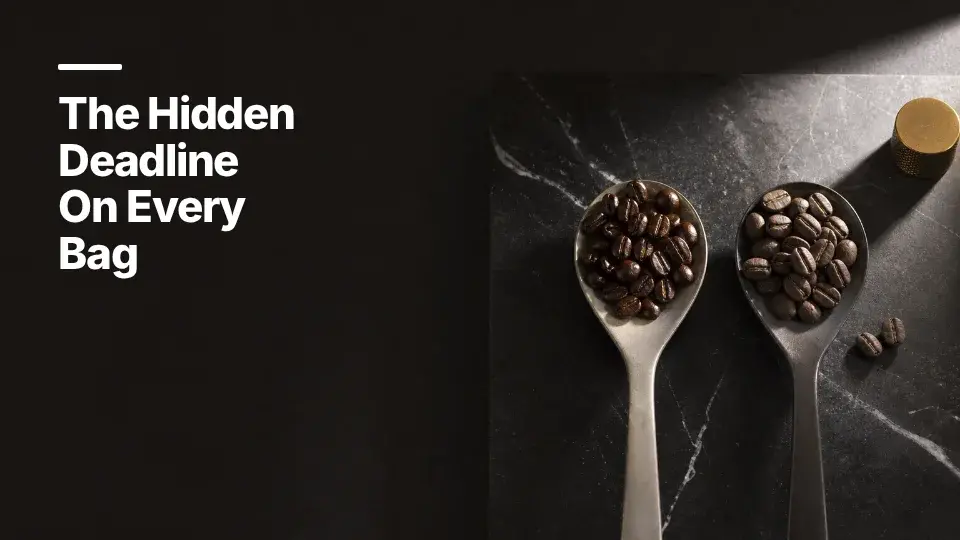
Conceptual Still Life
For businesses with something you can hold. Shown as product photography when they sell a physical product. Example brand.
For businesses with something you can hold. Shown as product photography when they sell a physical product. Example brand.
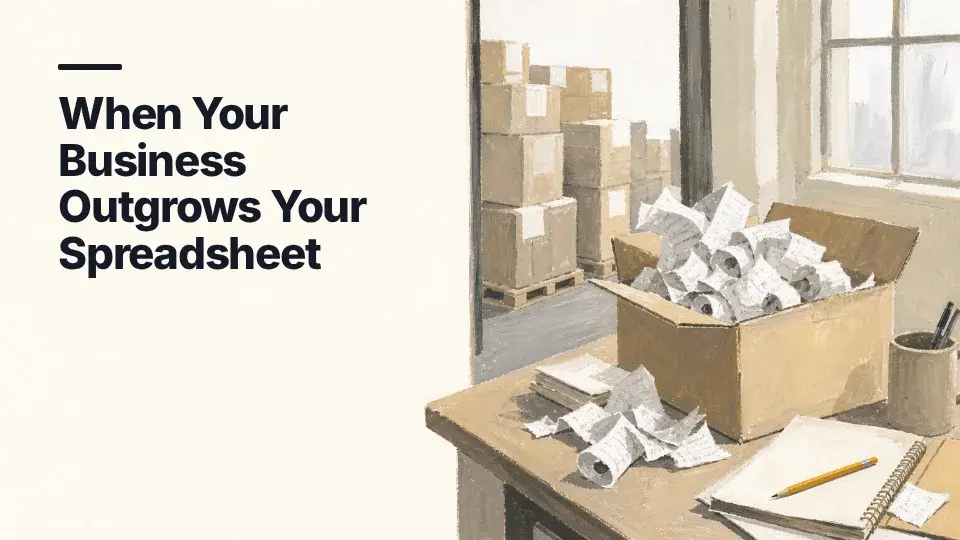
Illustration
Painted or drawn in a named medium, never flat clip art: one nameable subject with material and light. Example brand.
Painted or drawn in a named medium, never flat clip art: one nameable subject with material and light. Example brand.
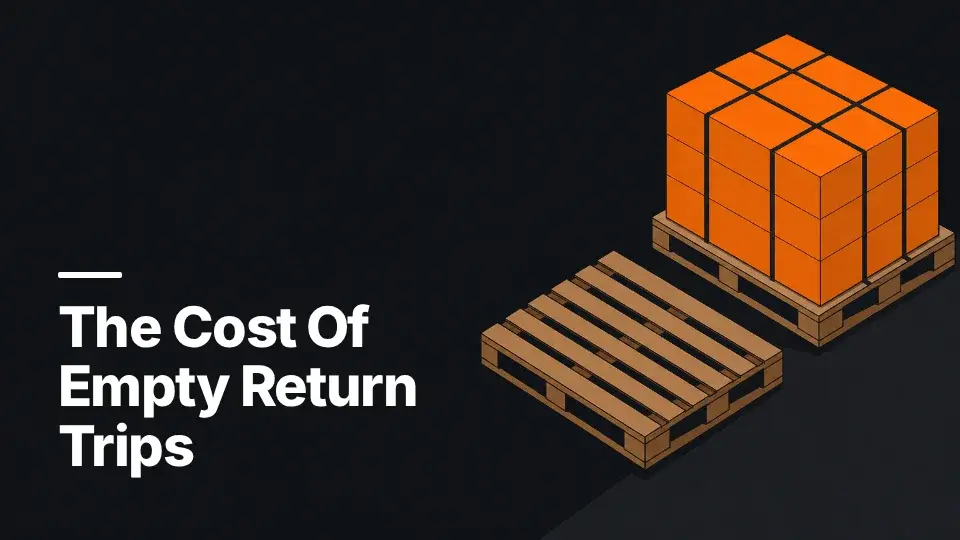
Graphic Design
Flat shapes of colour with hard edges, the language of a poster or an annual report opener. Example brand.
Flat shapes of colour with hard edges, the language of a poster or an annual report opener. Example brand.
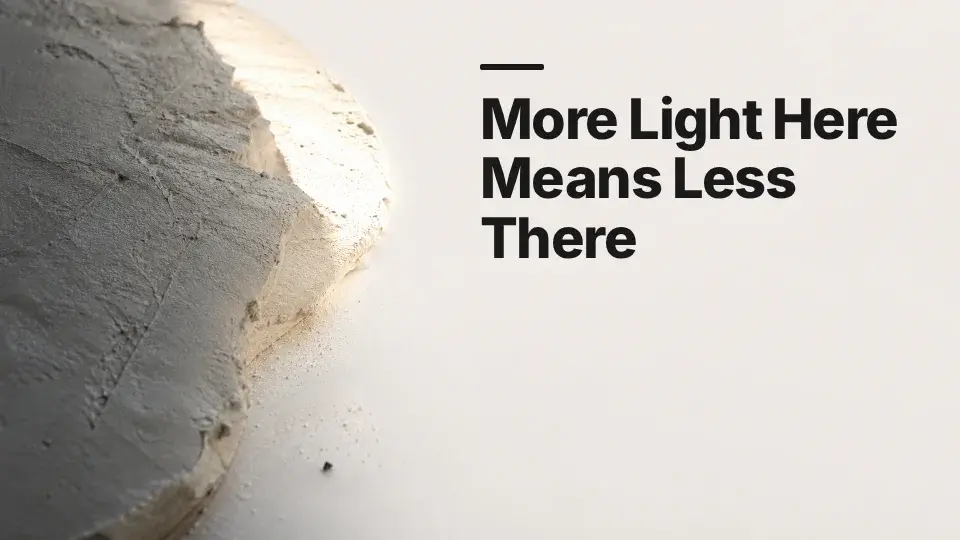
Abstract
A treatment rather than an object: light across a surface, texture, no nameable subject at all. Example brand.
A treatment rather than an object: light across a surface, texture, no nameable subject at all. Example brand.
Who It’s For
Who It’s For
Any UK SME that wants its blog to look like it has a creative director. Every site gets a card system that makes even a small blog look established, and with Expert mode businesses with strong photography can keep it.
Any UK SME that wants its blog to look like it has a creative director. Every site gets a card system that makes even a small blog look established, and with Expert mode businesses with strong photography can keep it.
Branded article images are included on every plan. See what each plan includes.
Branded article images are included on every plan. See what each plan includes.
Frequently Asked Questions
Frequently Asked Questions
Which One Will My Website Get?
Every website gets the Branded template. With Expert mode, on Growth and above, you can switch to art-directed pictures on the Brand page, which suits sites that lead with real photographs of their people and places.
Every website gets the Branded template. With Expert mode, on Growth and above, you can switch to art-directed pictures on the Brand page, which suits sites that lead with real photographs of their people and places.
Can I Switch Between the Card and Pictures?
Yes, with Expert mode on Growth and Scale, on the Brand page. Switching to pictures shows the six styles as samples made for your brand, so the choice is never blind. Existing articles keep their images and new ones follow the new setting.
Yes, with Expert mode on Growth and Scale, on the Brand page. Switching to pictures shows the six styles as samples made for your brand, so the choice is never blind. Existing articles keep their images and new ones follow the new setting.
What Is on the Branded Template?
A kicker line, the headline in bold capitals with one word in your accent colour, an isometric illustration of the article’s subject, your logo and your domain, on your brand ground. It comes in every size an article needs.
A kicker line, the headline in bold capitals with one word in your accent colour, an isometric illustration of the article’s subject, your logo and your domain, on your brand ground. It comes in every size an article needs.
What Are the Six Picture Styles?
Editorial photography, photography, conceptual still life (product photography for businesses that sell something physical), illustration, graphic design and abstract. Each is made in your brand’s tones and checked against your website before it is used.
Editorial photography, photography, conceptual still life (product photography for businesses that sell something physical), illustration, graphic design and abstract. Each is made in your brand’s tones and checked against your website before it is used.
Are the Pictures AI-Generated?
They are generated, but never left to a generator. Each is directed from the article, made to a style brief for your brand, and checked against your own website. One that fails is not used.
They are generated, but never left to a generator. Each is directed from the article, made to a style brief for your brand, and checked against your own website. One that fails is not used.
Related Features
Related Features
See It in Your Own Content
See It in Your Own Content
Start with a free seven-day trial, or see what each plan includes.
Start with a free snapshot of your website, or see what each plan includes.
Start with a free snapshot of your website, or see what each plan includes.
See Plans